Balance — Case Manager
Leave Case Management

Case managers carry 50 to 80 active leave cases at once. This product made deadlines visible, decisions clear, and case context easier to carry.

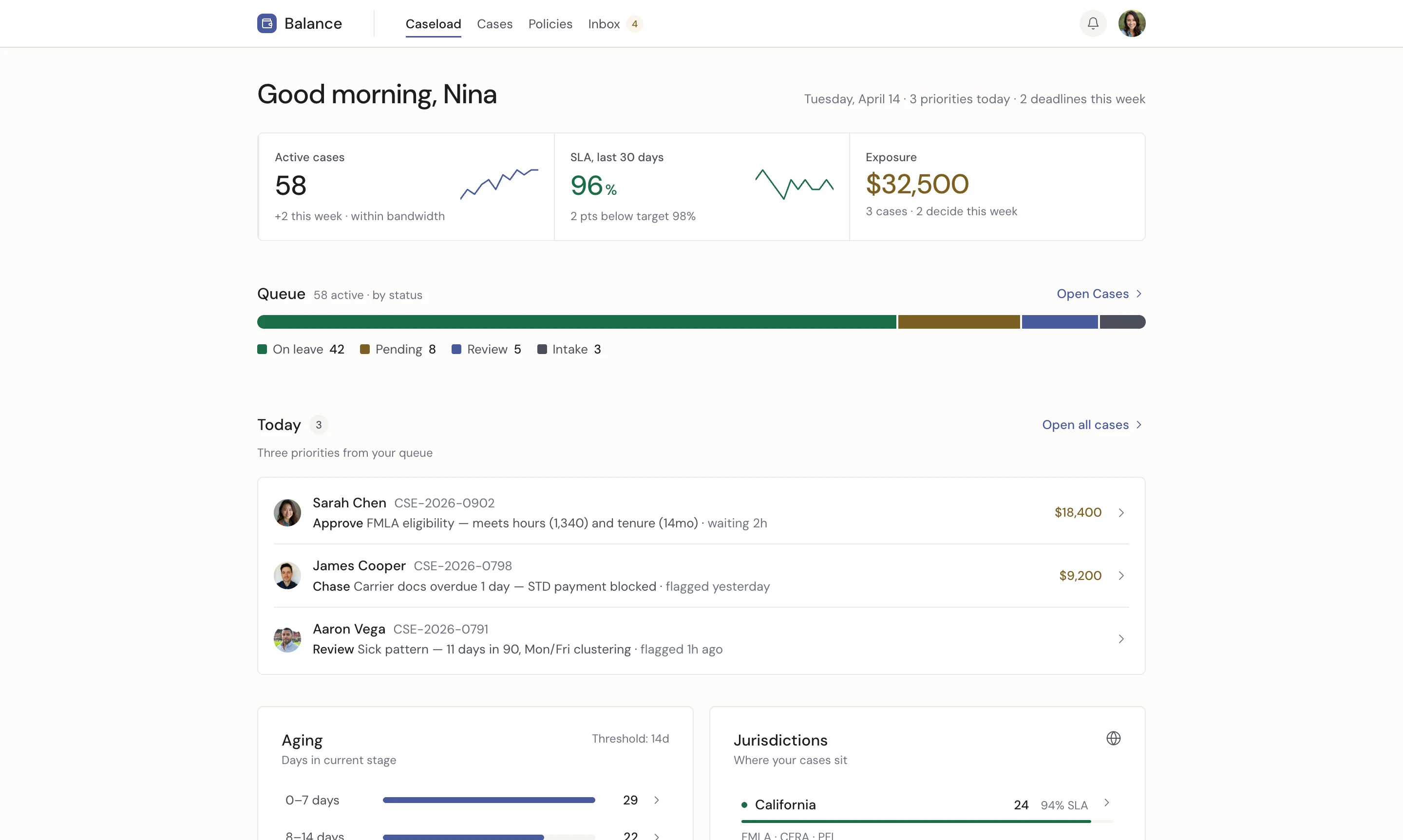
Balance case manager dashboard — today's decisions, caseload summary, aging cases, queue distribution

Today's decisions, aging cases, and jurisdictional risk in one view.

Case managers carry 50 to 80 active leave cases at once. Each case has a deadline, a form, and a decision that has to be defended.

No single tool held the case. Deadlines lived in spreadsheets. Evidence lived in inboxes. Carrier decisions lived in portals. Practitioners rebuilt context from scratch, case by case, every day.

Most products in the category optimize for administrative scale. This one started from practitioner judgment.

Create a case management surface for practitioners.
One operating system across caseload, cases, case profile, and employee communication — built to make decisions clear, deadlines visible, and case context easier to carry.

50–80 Active cases per practitioner
9 State statutes mapped
3 Federal forms in workflow

Start with caseload reality

The work follows a clear morning rhythm: open the caseload, review what aged overnight, make today's decisions, escalate what exceeds authority, and move cases forward.

The dashboard follows that sequence because the sequence is the work.

Practitioner workflow

Diagram: the practitioner's morning — five decision stages

Five stages. Ninety minutes. The dashboard follows the order of the work.
Decision sits at the center, where statutory timing and practitioner judgment meet.

Make the caseload absorbable

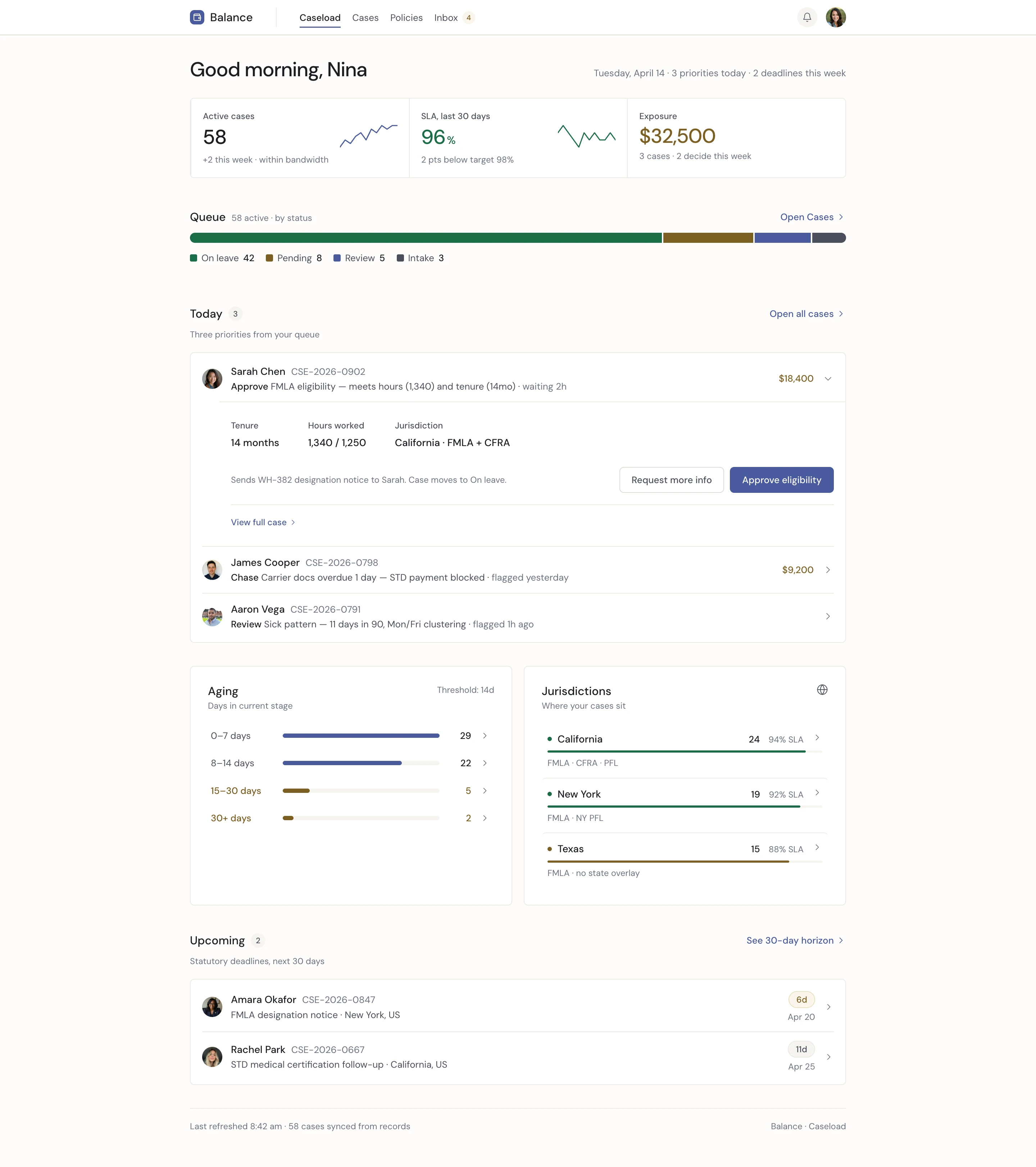
The dashboard is one scroll. Today's decisions lead. Aging cases follow with a next action per row. Jurisdictions show where risk sits. A queue shows volume at a glance. A sync footer names when the record was last reconciled, and from which system.

At 50-plus active cases, the practitioner is not the bottleneck. The surface is. This dashboard was designed to change that.

Balance caseload dashboard — exposure summary, today's decisions expanded inline, aging cases, jurisdictional distribution, queue distribution

Caseload — five modules, arranged in the order the practitioner works.

Name the decision clearly

Most case tools default to generic verbs: Approve. Defer. Review. That forces practitioners to open the case just to understand the action.

In Balance, the row expands inline. Eligibility facts are visible. The downstream effect is stated below. The buttons name the case-level action: Approve eligibility and Request more info. Practitioners can decide in context, without decoding a generic label.

Group cases by what needs review

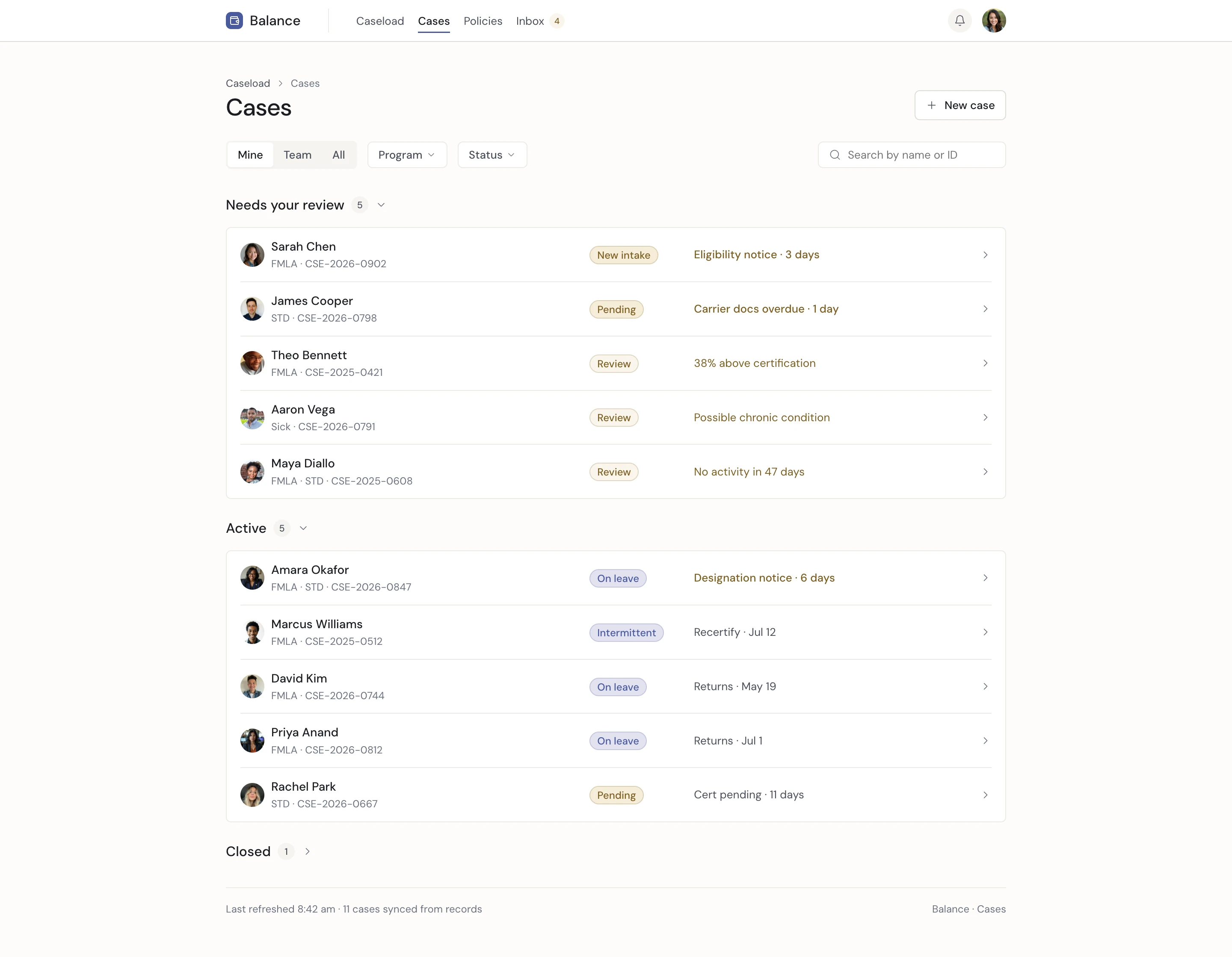
The cases list groups work by Needs your review, Active, On leave, and Closed — in the order practitioners care about it.

Needs your review leads because the first question is always: what requires me? Filters narrow by Mine, Team, All, program, and status — in the order practitioners actually use them.

Cases list grouped by Needs your review, Active, On leave, and Closed

Cases — grouped by what needs review, what is active, and what is closed.

Cases list header with filter chips Mine, Team, All, Program, Status

Needs your review leads. Filters match the practitioner's own view of the work.

Show the case across actors and deadlines

A leave case moves across the employee, manager, carrier, state, and federal government. Each actor has actions. Each action has a deadline.

The lifecycle diagram names who acts when. It became the architecture behind the case profile. Each section exists to make one part of that coordination visible.

Diagram: case lifecycle across five actors — Employee, Practitioner, Manager, Carrier, State and Federal

A case is not a single-actor decision. The practitioner coordinates five actors across five phases — each with their own forms, deadlines, and authority. The amber nodes are federal forms: WH-381 within 5 business days of eligibility determination, WH-382 within 15 calendar days of designation. They are not decorative. They are where cases fail.

Keep the case identity visible

The header keeps the case identity constant: employee, status, program dates, case ID, and assigned practitioner.

Practitioners do not have to reorient themselves every time they scroll.

Case profile persistent header with breadcrumb, employee, status, metadata, and action toolbar

Case header — persistent at every depth. Employee identity, case status, assigned practitioner. The action toolbar surfaces four case moves without opening a modal.

Structure the profile around the questions

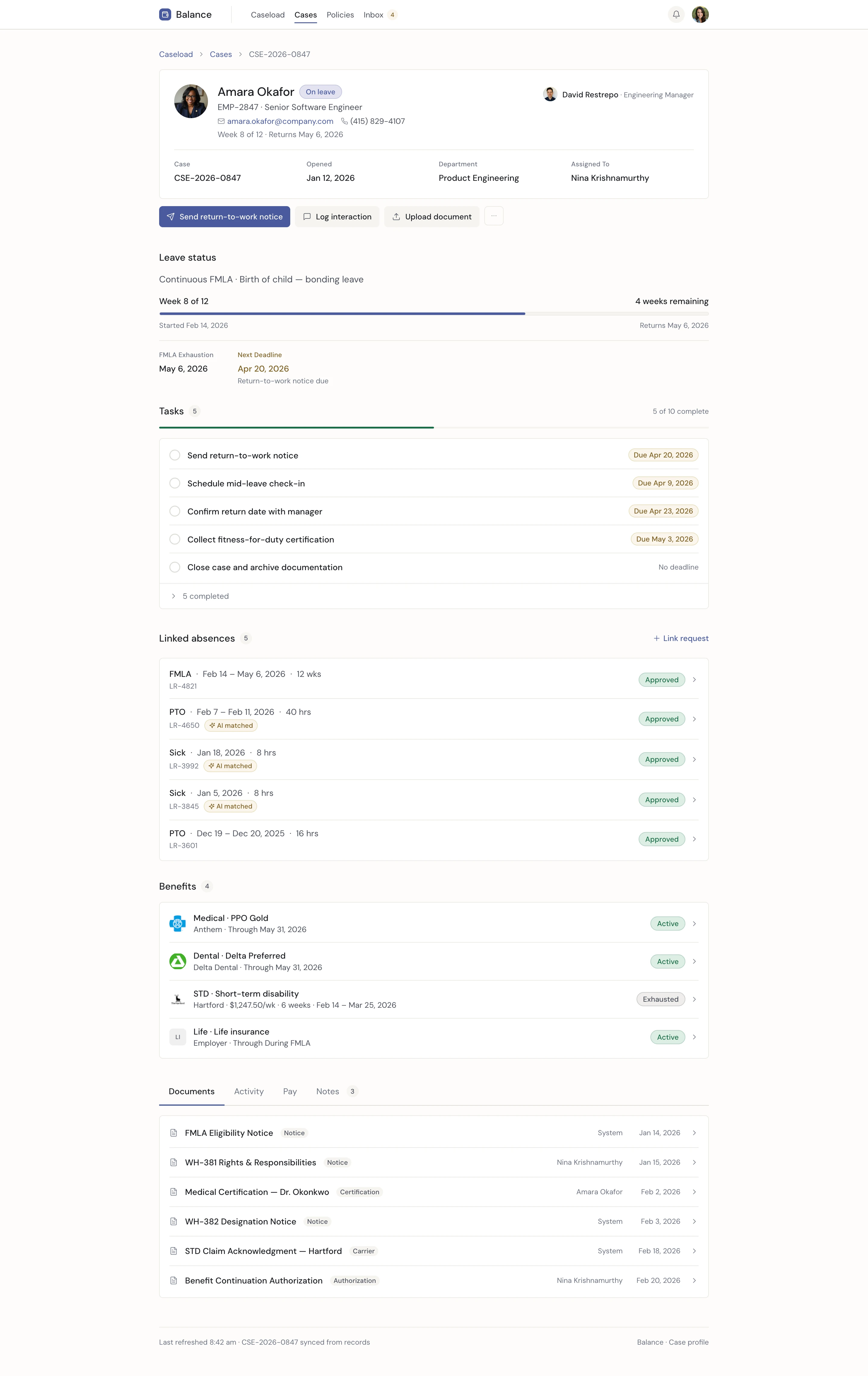
The case profile is one scroll, arranged in the order a practitioner asks questions: where the case is, what is due next, which absences are linked, and what happens to benefits, documents, pay, activity, and notes.

Each section is shaped around the answer the practitioner needs, not the shape of the data.

Full case profile page — header, leave status strip, tasks, linked absences, benefits, and documents

The full profile — one scroll, arranged around the practitioner's questions.

Link intermittent time with evidence

Tracking intermittent FMLA is one of the hardest compliance problems in the category.

Balance surfaces potential matches with supporting evidence. Practitioners decide whether to link them, and the system records why. Matching is never automatic. The evidence stays visible.

Case profile — Link requests side panel surfacing potential matches with evidence

Link requests — potential matches surfaced with evidence and a recorded rationale.

Answer the questions that follow designation

Three views sit at the bottom of every profile.

Pay names each transition — partial pay, STD, unpaid FMLA — so practitioners can explain the shift without reconstructing it.
Notes preserve practitioner memory, separate from the compliance trail.
Benefits answers the question employees ask first: what is still covered, who pays, and when it changes.

Pay tab showing named transitions

Pay

Transitions named. Numbers attached.

Notes tab

Notes

Practitioner memory, not the compliance log.

Benefits row expanded

Benefits

Premium, payer, changeover — one line.

Treat the case as a single object

A case is not just a row in a table. It is a single object made up of an employee, a program, dates, documents, linked absences, a carrier claim, tasks, and an audit trail.

Every surface references the same case identity. Domain language is part of the architecture, not decoration.

The case object — eight composition parts

Diagram: the case object — eight composition parts orbiting a central case identity

The case object has eight parts, one identity. Every surface — the cases list, the profile header, the employee email, the audit trail — references the same CSE number. Consistency is not style. It is the architecture of defensibility.

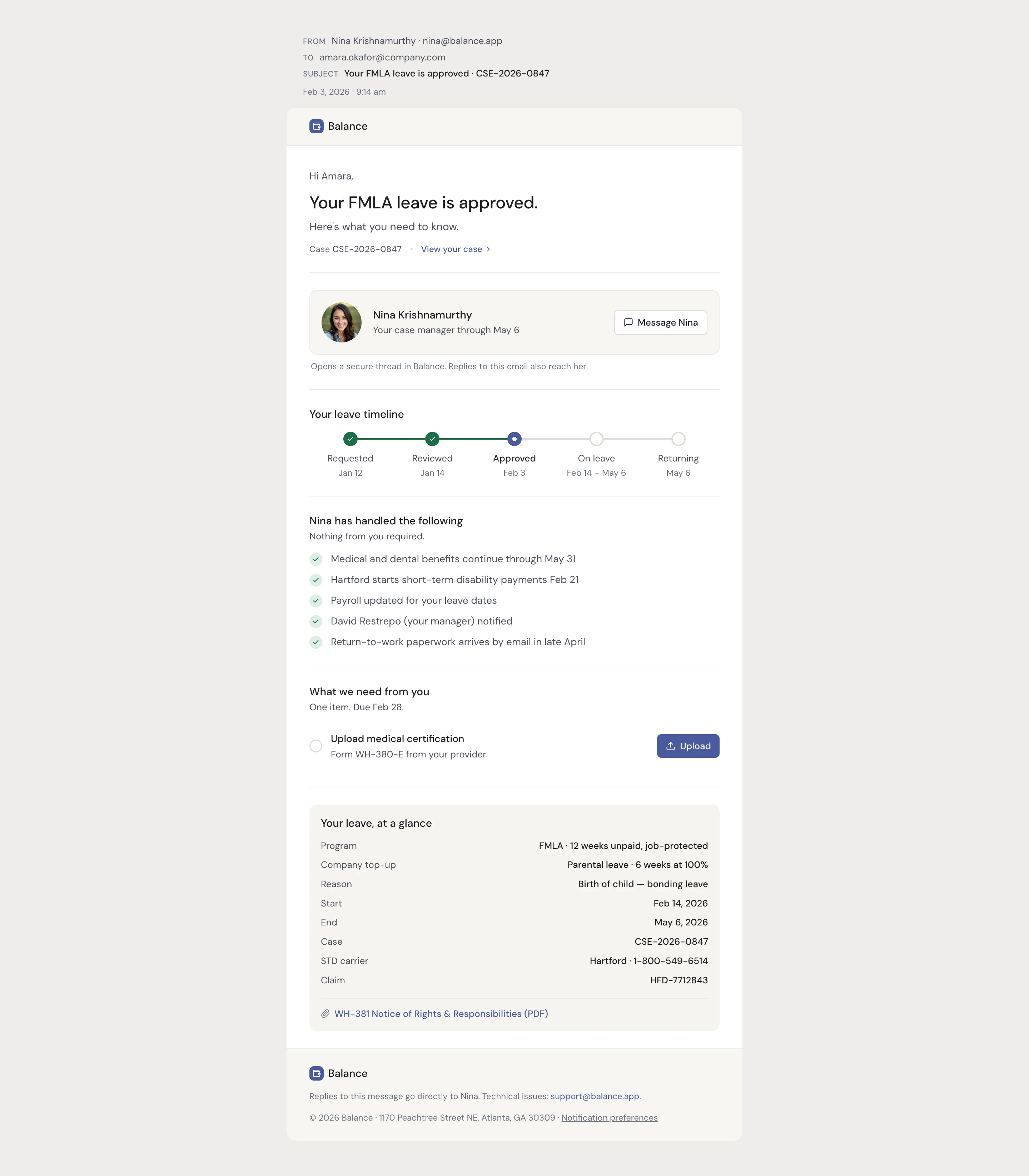
Make the email as defensible as the case

The decision does not end at designation. The employee receives it as an email, so the email has to carry the same clarity as the case surface.

The email leads with one sentence of status, introduces the case manager, shows the leave timeline, names what is already handled, and states the one thing the employee still owes.

Balance employee email — status, named case manager, leave timeline, peace-of-mind checklist, single required task

Employee email — one sentence of status, one named person, and one required task.

The case was treated as a single object, not a disconnected record. One identity carried across caseload, case profile, linked absences, and employee communication. The same facts stayed visible across every surface.

That decision resolved the coordination problem. The caseload surfaced what required the practitioner. The profile answered it in one scroll. The email closed the loop with the same facts already held in the case.

Before this, eligibility decisions required multiple systems and manual reconstruction. This product was built so deadlines, evidence, and decisions did not fall out of view.

This work started from the practitioner: mapping caseload, jurisdiction, and decision patterns across FMLA, STD, PFL, and ADA programs.